Greater Montreal
Telephone
514-499-8444
Toll free
800 848-0393
Eastern Quebec
Telephone
418 862-5643
Toll free
800 774-7418
Saguenay-Lac-Saint-Jean
Telephone
418 979-2991
Toll free
800 730-5658
expediteur-outlook

How do I add an approved sender in Outlook/Hotmail?

Not receiving our emails? They might be going to your spam folder. This quick guide shows you how to add an email address to your safe sender list in Outlook and Hotmail in 5 easy steps with screenshots.

Using Gmail? No problem , click here to view our Gmail guide.
1. Connect to your Outlook/Hotmail online mailbox

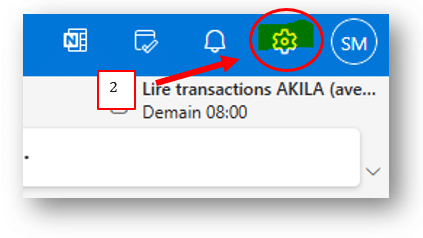
2. Once connected, at the top right of the screen, select “Settings”

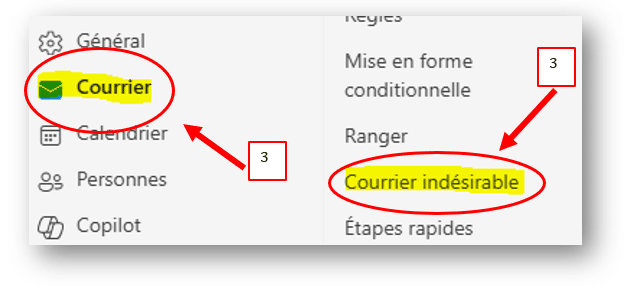
3. Then select the “Mail” tab, and “Junk email” :

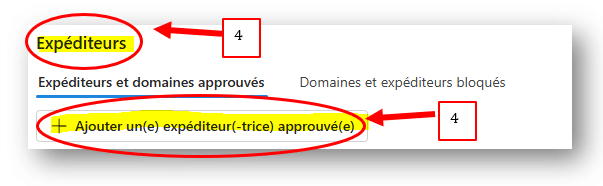
4. Under “Senders”, select “+ Add safe sender” :

Add the address: altafinaMTL@gestionpriveepeak.com , then click on “OK” and “Save” :

You are done !


About the author

Patrick Racicot

Patrick Racicot

Patrick is a portfolio manager at AltaFina. He holds the CFA® charter, an MBA specializing in investment management from Concordia University, and a Bachelor of Electrical Engineering from McGill University. Before becoming an advisor, he worked at one of Canada's largest corporate pension plans, where he contributed to investment selection and the construction of a portfolio exceeding 18 billion Canadian dollars. A father of two young children, he plays competitive volleyball, loves reading science fiction, and has been listening to podcasts on entrepreneurship, finance, and personal development for nearly 20 years.

Personal guidance.

Independent experts.

Results that speak for themselves.

Research

Privacy Overview

This website uses cookies so that we can provide you with the best user experience possible. Cookie information is stored in your browser and performs functions such as recognising you when you return to our website and helping our team to understand which sections of the website you find most interesting and useful.